

Basics of X4Fleet
A quick introduction for dispatchers, driver staff and management. In this article you will learn what is possible with X4Fleet and how it is structured.
What is X4Fleet?
X4Fleet is a comprehensive Transport Management System (TMS). It supports the planning and execution of transports. As a browser-based web application, X4Fleet is quick to deploy and easy to operate. Thanks to access for all necessary staff as well as interfaces to your surrounding systems, the required information is always available in the right place.
What can you do with X4Fleet?
Accept orders and interact with customers
With X4Fleet you are in close contact with your customers. You can enter orders manually based on a telephone or email request. To be even closer to your customers, you can also enable them to enter orders via the WebOrder platform, or import orders directly via an interface from your ERP or customer systems.
Your customers can be informed about the status of their orders at any time. Using various triggers, you can send email notifications or webhooks directly to your customers or via third-party systems. For example, send automatic delivery notifications or a delivery note by email to the right contact at the customer's site when a transport point is completed.
After an order is completed, you can send your customer an invoice directly from X4Fleet based on the services actually rendered. The price is calculated in X4Fleet using general or customer-specific price catalogues.
Track orders and prepare them for planning
The entered orders can be tracked in X4Fleet at any time. Display orders filtered by status, date or service area. With working areas, X4Fleet automatically moves orders into the responsible group or subgroup when they are saved, based on rules.
With X4Fleet, your customers can view the status of their orders at any time via WebOrder.
Incoming orders are prepared for planning using splits. Route splits divide orders into multiple partial legs. Quantity splits divide orders into smaller quantity units. With the help of split rules, this preparation can be automated.
Plan and optimise tours & routes
Orders and partial orders are scheduled onto tours in the dispatch view using automatic assignment or by Drag & Drop. Tours are created beforehand manually or automatically by the dispatcher.
A tour is assigned the corresponding staff and vehicle. In X4Fleet you can assign skills to staff and record qualifications on vehicles. During subsequent tour validation, it is checked whether the necessary requirements are met by the vehicle and staff. Necessary requirements can be defined for locations, items and customers alike.
When all orders on the tour have been entered, you can calculate or optimise the tour. Calculation determines the route based on the existing sequence. Optimisation adjusts the sequence of all orders for the best possible routing — taking into account, for example, pickup or delivery time windows.
Provide information for driver staff
A planned tour is released to the driver staff for execution via the Android Driver App.
As a driver, you see the assigned tour in the Driver App. Checklists support you in handling the tour. At the start, at stops and at the end of the tour, individual inspection logs can be created to assist driver staff in fulfilling their tasks and for documentation purposes.
The app navigates you to the next stop based on the planned route and vehicle parameters. With practical in-app navigation, route information and details about the next stop are displayed on the cockpit screen.
At the stop, stored information about the stop location, notes, and any access codes or drop-off locations are displayed.
Use real-time information from vehicles and staff
As a dispatcher, you see your fleet in real time. You monitor the planned and actual route as well as the status of all orders. You receive incident reports from driver staff and communicate directly with staff in the cockpit via Chatter.
As a driver, you acknowledge all tasks at the stop in the desired form (signature, photo, barcode, etc.) and record additional information, activities or corrections as needed.
All information is visible in real time in the backend (web app). It can also be made available to customers via notifications or interfaces.
Increase quality and efficiency in transport
With the X4Fleet API, you connect your ERP or surrounding systems directly, ensuring a seamless data flow.
X4Fleet calculates the most efficient routes and supports you in optimally utilising your fleet.
Export your data, or receive it via API for analysis with common BI tools to optimise your fleet, your transport strategy and your goods flows.
Structure of X4Fleet
How is an order structured in X4Fleet?
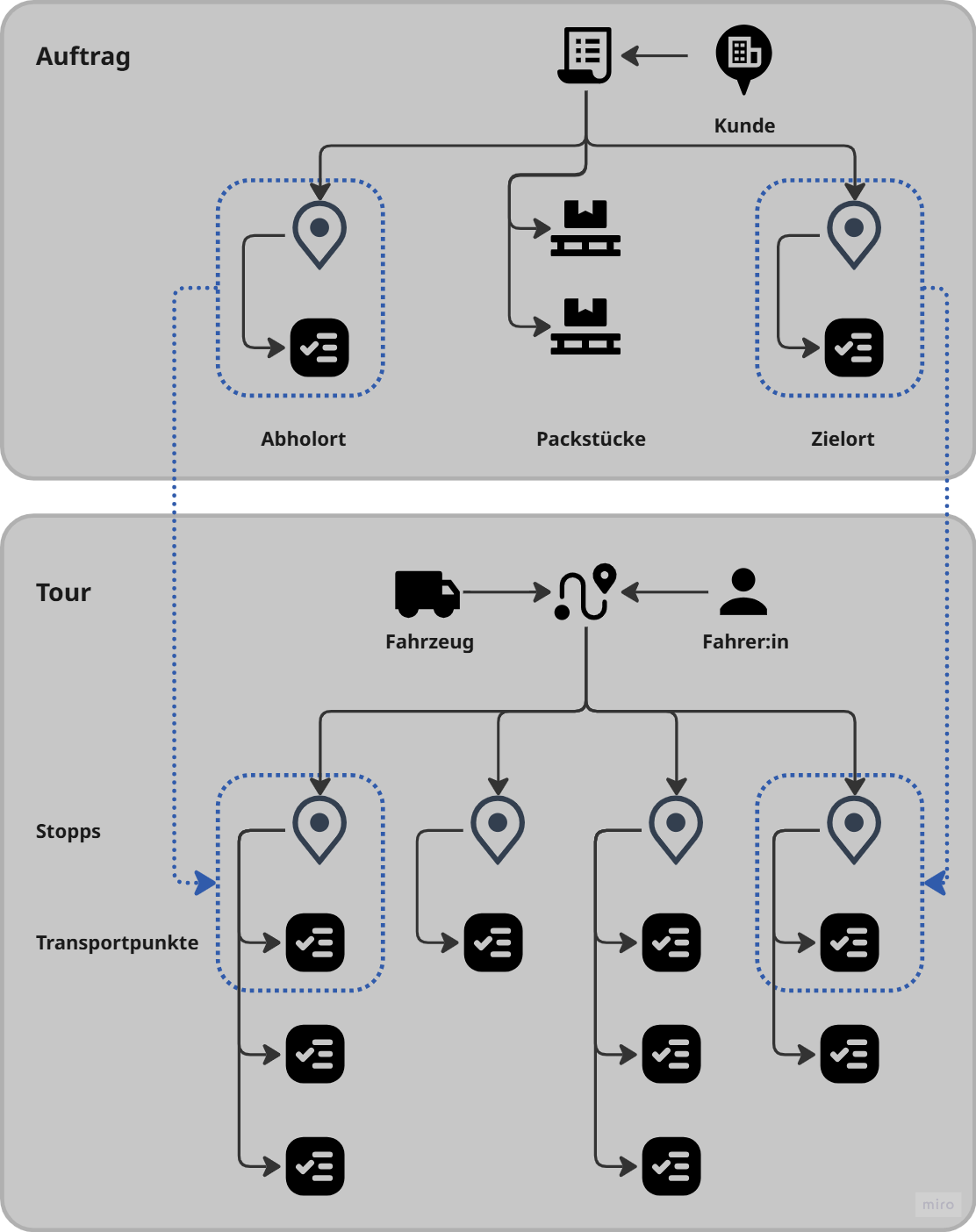
The order is the core element of X4Fleet. It contains the following elements:
- Customer / Client: The client orders the transport service and usually pays the invoice. The customer is the final beneficiary of the transport service.
- Shipment: A shipment represents the transport of a number of packages from the pickup location to the delivery location.
- Partial order: A partial order is a subdivision of an order by route (route split) or by quantity (quantity split).
- Pickup location: The location from which the cargo is collected.
- Delivery location: The location to which the cargo is delivered.
- Items / Packages: The package items represent the cargo. An order can contain any number of packages. Items can also include other billable services in addition to packages.
How is a tour structured in X4Fleet?
A tour is assigned any number of orders or partial orders. It contains the following core elements:
- Stop: A stop corresponds to the halt position at a physical address. A tour contains any number of stops. Each stop can contain multiple transport points.
- Transport point: A transport point corresponds to the loading or unloading order for a shipment within a stop.
- Vehicle: A vehicle has a clear definition regarding dimensions and qualifications. It is assigned to a tour to ensure its execution.
- Driver: Each tour is assigned a driver. Drivers are assigned skills required to operate certain vehicles.
Roles
The fundamental roles (i.e. actors) in the system are described here. These are not the roles (collections of permissions) that are assigned to users in X4Fleet.
Dispatch
The dispatcher plays a key role in the use of X4Fleet. They are responsible for the daily short- and long-term planning of resources, tours and orders. They work in the web app (backend) and are the point of contact for internal and external stakeholders.
Day-to-day work includes medium-term planning and allocation of resources such as driver staff, vehicles, trailers, etc., the acceptance and preparation of orders and the correct scheduling onto tours.
Driver staff
Driver staff carry out the actual tours. As a driver, you use the X4Fleet Driver App for navigation, to complete tasks at stops, and to contact the dispatcher via Chatter when needed.
IT Administration
IT admins are responsible for managing users, assigning roles and ensuring appropriate integration into the system landscape. Their work is often most intensive during the rollout phase or when changes are made. Otherwise they are primarily involved in user management for onboarding and offboarding.
Accounting & Finance
In most cases, accounting has no direct connection with X4Fleet. The relevant information such as invoice data, address data and reports is typically made available to accounting by the dispatcher via interface or export.
Management
Management usually receives the relevant information for key management decisions from the dispatcher via exports and reports. In most cases they therefore do not need to engage with the structure and interface of the system.
Devices
Desktop Application
The desktop application (also called web app or backend) is the primary working tool for planning and dispatch. It runs on all common computers with internet access.
Driver App
The X4Fleet Driver App supports driver staff in executing tours, navigating, displaying available stop information, and guiding through pending tasks at stops and at the start and end of a tour.
It runs on Android devices that are mounted in the cab with suitable holders.