

Manual Order Import
Manual Excel import directly into X4Fleet.
Customers who do not have the ability to import orders via an interface can use the Excel import. To do this, use the "Import" function in X4fleet under Orders or Unallocated:
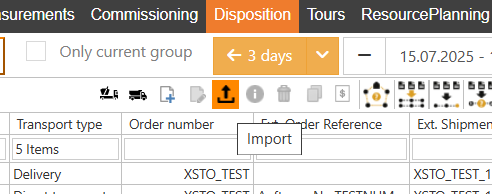
The file must follow this template:
The same template can also be used for the import on the WebOrders page.
Important: rows 1 & 2 must not be modified, as they define the field names. After that, column A must always contain the German designation "Auftrag" (order) or "Position" to define whether the row represents the encompassing order or the positions contained within it. Positions belong to the order in the row above them; multiple positions can be passed per order.
File
- Only Excel files in the format .xlsx or .xlsm can be imported. The older format .xls is no longer supported: save the file as .xlsx in Excel.
- The sheet "Aufträge" is read, otherwise the first sheet.
- A file can contain at most 2000 orders.
- Columns are found by their name in rows 1 & 2; the order of the columns does not matter.
All or nothing
The file is imported as a whole: either all orders are saved or none. If there is an error, X4fleet shows the errors with the row number of the Excel file; after correcting them, the whole file can be imported again. This applies to the orders: new locations, clients, purchasers, contacts and articles from the file are created first and remain saved even if there is an error.
Exception: if the import does not answer in time (e.g. for very large files), the result is unknown, and the orders may still be saved. Before importing again, first check in the order list whether the orders already exist.
After a successful import, the order list, the unallocated shipments and the tours are reloaded, because the import can also create tours or assign shipments to frame tours.
The import settings of the group apply, e.g. automatic release and assignment to frame tours.
Values
- Numbers: decimal point or decimal comma, a thousands apostrophe is allowed (e.g. 1'250.5).
- Date and time: e.g. 13.10.2026 08:30, 2026-10-13 08:30 or an Excel date cell. Times are taken as Swiss time.
- Lists (specialities, vehicle qualifications, loading tools): separate several values with a semicolon, e.g. SP_1;SP_2.
- Stackable / Pilable (AP_Stabelbar / AP_Schichtbar): 1, x, ja, wahr, true, yes, oui, si count as "yes". All other values and an empty cell count as "no".
- Shipment reference: A_ExterneSendungsreferenz; if it is empty, it is built from the order number and the pickup date (e.g. M15_8001_05.06.2026).
- Origin: A_Ursprung is saved as the source of the shipment. Shipment reference and source together identify orders that have already been imported.
Whole numbers
Only whole numbers are allowed in these columns. A value like 2.5 is an error; it is not rounded:
- A_Auftragsstatus
- A_Von_Art, A_Zu_Art
- A_Von_Stopzeit, A_Zu_Stopzeit (stop time in minutes; these columns are not in the template but can be added)
- AP_Nummer
Maximum values
These values are stored after unit conversion. Larger values are an error:
| Column | Maximum value |
|---|---|
| A_Bruttogewicht(kg) | 2'147'483 kg |
| A_Bruttovolumen(m3) | 2'147 m³ |
| AP_Gewicht(inKg)proEinheit | 2'147'483 kg |
| AP_Volumen(inm3)proEinheit | 2'147 m³ |
| AP_Volumen(inLiter)proEinheit | 21'474'836 l |
| AP_AbmessungBREITEincm, AP_AbmessungHOEHEincm, AP_AbmessungLAENGEincm | 214'748'364 cm |
| AP_Lademeter | 21'474'836 m |
Columns that are not imported
The columns AP_Packstueck_GUID and AP_WertinCHF, as well as columns the import does not know, are not imported. If they are filled, X4fleet shows a note after the import; the import is still carried out.