

Release Notes
All new features and improvements in X4Fleet at a glance.
Here you will find the current Release Notes for X4Fleet with all new features, improvements and bug fixes.
The Q3 2026 release completes several roadmap initiatives and brings a broad set of improvements across planning, monitoring and integrations. Highlights are the first version of the new Resource Planning board – an interactive drag & drop planning board for tours, vehicles, trailers and drivers – and the continued modernization of the dispatcher interface, with a reworked monitoring page, a new map engine and many master data pages in the new design. In addition, the new driver app is now feature complete, and split orders can be reported on the parent order. As always, the release also contains numerous stability improvements, bug fixes and API extensions.
Resource Planning – Version 1
With this release, we introduce the first version of the new Resource Planning module: one interactive planning board on which dispatchers can view and manage tours, vehicles, trailers and drivers on a timeline. This first version (MVP) is tour-based; shipment planning and timeline disposition will follow in the next iterations.
Highlights:
- New planning board with a timeline (Gantt view), showing tours as bars coloured by their status
- Flexible views and groupings: look at your planning by tours, vehicles, trailers or drivers
- Freely selectable date range with step-by-step navigation
- Assign vehicles, trailers and drivers to tours via drag & drop
- Move and resize tour bars directly on the timeline to reschedule tours or change resources
- Conflict detection: the board warns you when a change breaks a planning rule, using the same warnings as the disposition
- Unavailabilities of vehicles, trailers and drivers are shown on the timeline and can be added and edited directly on the board
- Right-click context menu: edit tours, vehicles, trailers and drivers with the familiar edit forms, or create new tours, vehicles, trailers and drivers directly from the board
- Row filtering with filter chips (e.g. filter the vehicle view by tour, trailer or driver)
Important note:
- The new Resource Planning runs alongside the current resource planner, which remains fully available. You can switch between both and get familiar with the new board at your own pace. We welcome your feedback via our support team.
New Driver App (NDA) – Feature Complete
The new driver app is now feature complete and covers the full functional scope. It is currently in the stabilization phase; its rollout will be communicated separately. To support the full scope, the backend has been extended with all required settings and interfaces. All new app settings can be configured centrally per main group and subgroup and are transferred to the app with the tour download.
Highlights:
- New navigation settings for the app: choose the navigation provider (Google Maps or Sygic) and whether vehicle master data from X4fleet should be used for truck navigation
- New setting "Allow driver to change vehicle of tour": drivers can download and start a tour with a different vehicle than the one planned; the vehicle assignment is updated automatically in X4fleet
- New setting "Allow visual sorting of transport points inside loading stops": drivers can temporarily change the display order of transport points within a loading stop
- New signature option: signatures can now be excluded at depots (for pickup and for dropoff)
- The tour route is now calculated in the backend and provided to the app for display on the map
- Improved security: when a user's validity ("valid from" / "valid until") or access changes, active app sessions are now ended automatically, and expired driver accounts can no longer log in
- Fixed: in some cases the app showed tours from neighbouring days in the tour download, which also affected the preloading feature
- Fixed: creating AdHoc orders (AdHoc2) via the app could fail with an unexpected error
Dispatcher UI Enhancements
The modernization of the dispatcher interface continues. In this release, the focus is on the monitoring page, a new map engine for all maps and the migration of master data and configuration pages to the new design.
Monitoring:
- Live updates: stop and transport point statuses, estimated and actual times, delays, special events and tour status now update automatically – without reloading the page
- Live vehicle positions continue to update reliably, also after a connection interruption or for vehicles that start later in the day
- New tour and order search in the monitoring sidebar
- Transport point details are now shown directly next to the stop list and display all configured fields
- New buttons for shipment review (per stop and transport point) and for checklists in the tour header
- Driver text and voice messages are now accessible from the header and can be marked as read or played back directly
- Disposition-only buttons have been removed from the monitoring map for a clearer view
Maps:
- All maps (monitoring, disposition, offers, location pickers and address search) now run on a new, faster map engine based on PTV Developer, with improved stability and performance
- Fixed: Google Maps in satellite or hybrid mode no longer turns blank when zooming into the 3D view
Master data & configuration pages in the new design:
- Articles (products) – including all tabs such as prices, dimensions, specialities, qualifications and custom fields
- Vehicles – including all tabs such as dimensions, equipment, toll & emissions, availability, pricing and documents
- Log books, location types, areas, cell colouring rules, checklist items, contacts, Euro emission standards, hitch types, lines, goods groups, vehicle qualifications, vehicle kinds, invoice mandates and mobile devices
Rework of Splits
Split orders (way splits and quantity splits) can now be handled from the perspective of the original parent order.
Highlights:
- Reports based on the parent order: reports can now be generated for the complete parent transport order, giving your customers an end-to-end view from pickup to delivery without internal depot hops. Reports per child shipment remain available as before
- Fixed: barcodes of shipment positions are now kept when a shipment is split by route (way split)
Route Planning & Optimization
Several improvements make route planning with the Optiflow engine more transparent and reliable.
- Improved free tour planning: a new results dialog lists all planning problems in readable form, lets you jump directly to the affected shipment, apply an existing planning result or continue planning while ignoring time windows. The planning duration now adapts to the number of tours and orders
- Tours with technical stops can now be calculated correctly: the technical stop keeps its position and its times are respected
- Depot departure and depot return stops no longer receive a stop time
- Stop times are no longer counted multiple times when several transport points are combined into one stop
- Fixed: tours with newly added shipments could not be recalculated during execution ("task duration is too large…")
- Fixed: with "Always reverse tour" active, the reversed order was reset after calculating the tour
- Fixed: incorrect calculated sort order and distribution of shipments with a fixed sort order after optimization
- Fixed: free tour planning failed with an error for delivery tours
- Fixed: planned and pre-combined tours were not automatically calculated and released according to the group settings
- Dumpster (Mulden) orders: combining stops no longer removes transport points, and several issues when merging dumpster orders have been resolved
Orders, Web Orders & Commissioning
- New web order setting: define how long orders without a "till" date remain visible in the web orders table
- The external shipment reference can now be edited in the commissioning module, so warehouse staff can enter it directly
- Checklists: the product filter for automatically shown checklists now offers all product types (previously only liquids)
- Invoicing: manually changing a surcharge now updates the total price immediately
- Fixed: the order search showed dates in US format (MM/DD/YYYY)
- Fixed: the "Shuttle duration" column in the orders table showed only hours
- Fixed: Excel files were not shown in the file selection of the manual shipment import
- Fixed: pictures that drivers added to a location could not be deleted
- Fixed: locations created via the client form did not have "Allow update over gateway" enabled by default
- Fixed: keyboard shortcuts Shift+P (tour reports) and Shift+Q (tour check) in the disposition work again
- Fixed: changes to advising message templates were not saved
- Fixed: SMS advising messages were sent at the wrong time
- Fixed: the "Revert self disposition" button was shown although self disposition was not active
- Fixed: an error occurred when adding a custom field caption
- ASTAG GU freight rates have been updated to the 2027 version
System Integrations & API
- Gateway clients & contacts: contacts are now updated correctly via PUT instead of being duplicated, contacts without a RefId no longer return an invented RefId, and the contact field "Organisation" can now be set and read via the Gateway
- Location notes are now copied to the pickup/dropoff notes when shipments are created via the Gateway (same behaviour as in the web)
- The tour name can now be updated via the Gateway (PUT tour)
- Shipment import no longer stalls when a delivery location with a new, not yet geocoded address is imported
- Webhooks: e-mail notifications for webhook errors are sent reliably again, and with shipment review active, all tour status webhooks are now triggered in the correct order
- Fixed: drivers of a subcontractor group could not download tours planned by the main contractor in the app
- Fixed: importing tours with shipments in one request could result in an empty, unreleased tour
Platform & Security
- New public status page at status.x4fleet.com: see the current and historical availability of all X4fleet services (web, Gateway, app API and SFTP) and stay informed about incidents. It is based on new health checks that monitor all X4fleet services
- The documentation under /docs again requires an X4fleet login
- Various minor bug fixes and stability improvements across the platform
Thank you for your continued trust in X4fleet. We remain committed to delivering a stable, modern and continuously improving transport management system. If you have any questions, please contact your account manager or our support team at any time.
The Q2 2026 release moves four of our key roadmap initiatives forward and completes a major change under the hood. The New Driver App gains new configurable behaviours, the Simple User Interface migrates further pages onto its new framework, and the Rework of Splits fundamentally improves how parent and child orders are handled. We have also laid the groundwork for Single Sign-On (SSO) and, as part of that work, introduced a new, more modern web login. In parallel, the new Optiflow (PTV Developer) planning engine becomes the default for all tour planning, Spanish is added as a fifth interface language, and the release includes a large number of reporting, integration, security and stability improvements.
New Driver App
Work on the new driver app continues with a set of backend and API additions that make the app more flexible for different customer workflows. Several behaviours can now be controlled centrally through app settings, and driver-facing information has been extended.
Highlights:
- The Beta-Test of the new driver app has been launched successfully and the returned feedback is flowing directly into the further development.
Important note:
- The delivery of the new driver app (phase 1 and 2) will be announced separatly.
Tour Planning – Optiflow (PTV Developer) is now the default engine
Following the Q1 beta, the migration to the next-generation planning engine (Optiflow, based on PTV Developer) is now complete. Optiflow replaces the previous xServer1 engine as the standard for tour planning.
Highlights:
- Optiflow is now the default planning engine. The option to choose the planning provider has been disabled and set to "Developer", and existing tour settings, open tours and precombined tours are automatically migrated.
- Calculate and Amend now run on Optiflow, completing the move of the core planning actions to the new engine.
- Vehicle parameters and order-position parameters are now mapped to Optiflow for more accurate optimisation.
- Fixed-stop handling delivered for the first-customer use cases.
- Numerous correctness and stability improvements, including sort-order handling after amend and allocation, free tour planning after go-live, toll-cost display and planning-duration defaults.
Important note:
- With this release the engine selection is no longer configurable per tour – Optiflow is used throughout. If you have questions about the migration or notice any differences in planning results, please contact our support team.
Dispatcher UI Enhancements
The overhaul of the dispatcher interface continues. This release migrates further pages onto the new, higher-performance framework and stabilises the pages already delivered, while preserving the workflows dispatchers rely on.
Highlights:
- Further improvements to the behaviour of the new side navigation.
- Additional pages moved to the new design and framework.
- The notification workflow is preserved in the new navigation: notification counts are shown at both category and page level – including for pages marked as favourites – with live data grouped under Monitoring.
- Quick links to the support portal and the technical documentation are now available under the profile menu.
- Ongoing stabilisation of the pages and features delivered in the first phase (including the Storage balance and Order search views).
- Fixed: the "old version" button is now shown correctly to all relevant users.
Important note:
- As with the first release, the "Old version" button in the footer remains available so you can fall back to the previous stable version while getting used to the new navigation.
Rework of Splits
Order splitting has been redesigned to give a clearer, more reliable parent/child structure and to keep automated (ERP) integrations working after a split. This is the foundation for the improved split handling on the roadmap.
Highlights:
- The original order now remains the parent. Previously, splitting a shipment (quantity or way split) created a new parent and turned the original shipment into the first child. The original shipment now stays as the parent, and all children are created as new records – so the original shipment ID is preserved.
- API stays stable after a split. Because the parent keeps its original ID, ERP and dispatch systems can continue to find and update the order via API, and individual child shipments can be updated separately.
- End-to-end parent view for reports, proof-of-delivery documents, invoicing and web-order views: you can report on the parent transport order as a whole or on individual child shipments, and see planned versus actually delivered quantities.
- Actual values propagate downstream: quantity and product changes made on one leg are propagated to the subsequent child shipments, so information stays consistent along the whole transport chain.
- Way splits within a tour: way splits are no longer limited to unassigned shipments and can now be performed on shipments already in a tour – supporting cross-docking and subcontractor/last-mile scenarios.
- Improved tour selection when several shipments are split by way split at once.
Single Sign-On (SSO) – Groundwork & new login design
We have begun the groundwork for Single Sign-On, a roadmap feature that will later allow users to log in to X4fleet with their existing company credentials. In this release the technical foundation was built – and, as part of that work, the web login has been given a new, more modern design.
Highlights:
- A new, more modern login workflow and design on the web.
- Initial groundwork for future client SSO integrations, including a new authentication server and handling of customer/account state during the login process.
Important note:
- This release contains only the groundwork for SSO. Logging in through your own company identity provider (SSO) is not yet available and will follow later according to the roadmap. The only change visible to users in this release is the new login design.
Loading Unit Management
For customers using the loading-unit management module, balances of load carriers (for example euro pallets) can now be tracked automatically.
Highlights:
- When the module is active and a product is configured accordingly, the balance of load carriers at a location is updated based on the difference between picked-up and delivered quantities at each stop.
- Balances are updated on stop completion, using the actual values recorded by the driver or entered by the dispatcher, and a history is kept. A balance can be negative (more picked up than delivered).
Toll & Emissions
The toll and emission calculation has been extended with additional vehicle and trailer parameters to support more countries.
Highlights:
- New vehicle/trailer parameters number of tires and height above the front axle are included in the toll and emission calculation (for example for country-specific tolls). These fields are shown when the Toll & Emissions module is active.
Reporting & Exports
This release extends report content and improves the reliability of exports and filtering.
Highlights:
- Additional fields available in reports: tour custom fields and load-platform consumption in the tour report; the "ready for commissioning" flag and total required quantity in the shipment report.
- New columns in the orders table: planned pickup/dropoff arrival and departure times, and pickup/dropoff location type and kind (filterable).
- Excel exports from tables now respect the active filters and reliably handle large data sets.
- Fixed: several report filtering issues and inconsistent report fonts.
Dispatching & Order Management
A large number of smaller improvements and fixes across order entry, dispatching and master data make everyday work smoother and more reliable.
Highlights:
- Spanish has been added as a fifth interface language, across the web console, the API and the Gateway.
- New commissioning settings: commissioning ("ready for commissioning") can be enabled or disabled for shipments without a tour, and the status can be prevented from being reset once set.
- Monitoring now shows the contact name together with the phone number of the first contact.
- Imports no longer trigger unnecessary re-planning (unallocate/reallocate) of shipments.
- Corrections to working-area assignment, additional depot-city columns on the tours grid, and improved translations.
- Numerous stability fixes when saving orders and allocated shipments, generating precombined tours, running auto-planning and auto-release, and working with grids and column selection.
Integrations & API
Integration reliability has been improved and a key mail integration has been future-proofed.
Highlights:
- Mail delivery migrated from SMTP to OAuth 2.0 (Microsoft Graph), ahead of Microsoft's planned shutdown of SMTP-based delivery.
- Improved Gateway/API logging and clearer error responses (for example when an attachment cannot be found).
Platform & Technical Infrastructure
As every quarter, this release includes a range of internal improvements that strengthen the technical foundation of X4fleet.
Highlights:
- Expanded observability: distributed tracing (OpenTelemetry), consistent trace IDs across the API, Gateway and background jobs, and SQL query tracing – making issues faster to diagnose.
- The extended technical documentation is served in-app at
/docsfor logged-in users. - More control over background jobs (including the ability to stop and restart jobs without restarting the app service) and improved job reliability.
- Expanded automated test coverage, along with various performance and cost optimisations across the platform.
Thank you for your continued trust in X4fleet. We remain committed to delivering a stable, modern and continuously improving transport management system. If you have any questions, please reach out to your account executive or our support team at any time.
The Q1 2026 release includes important roadmap initiatives and a wide range of platform improvements. At the center of this release is the beta version of the new driver app – a completely newly developed, fully modernized driver experience built from the ground up. In parallel, the portal user interface continues to evolve with an initial major release, and behind the scenes, a new alternative route planning engine (Optiflow) has been introduced. In addition to these strategic features, the release includes numerous stability improvements, bug fixes, and API extensions across dispatching, reporting, and system integrations.
New Driver App (NDA) – Beta Version
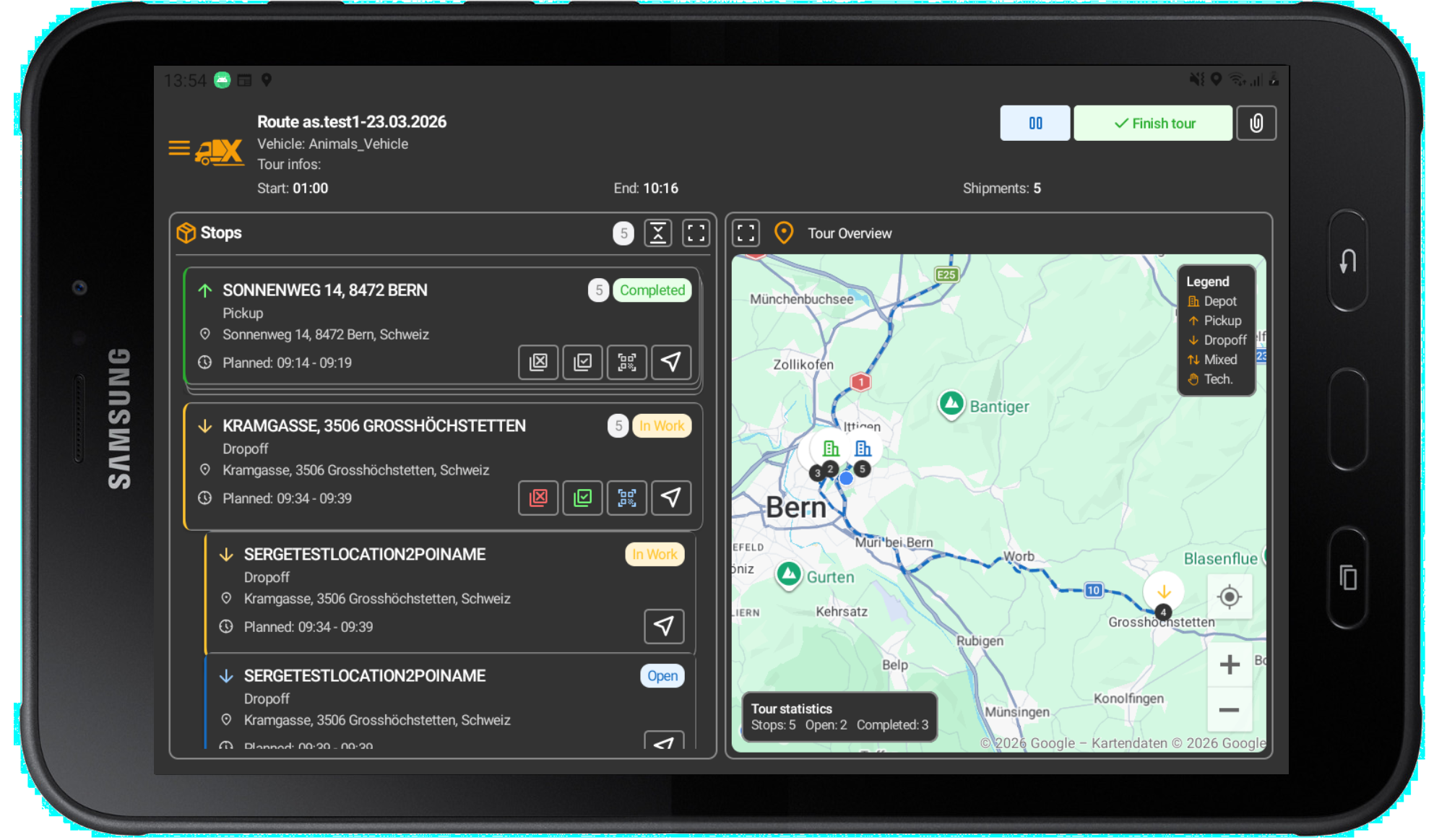
This release marks the beta version of the new driver app, a completely redesigned and modernized mobile application for drivers. In this MVP beta phase with a selected group of testers, the app is soon ready for broader rollout. The new app provides a significantly improved user experience with a clearer interface, improved performance, and extended support for driver workflows.
Highlights:
- Optimized tour and transport point management with a modern UI design
- Improved barcode scanning and support for multi-scanning at depot stops
- Improved checklist and special event handling
- Special descriptions are now displayed to drivers in the app (API extended with description field)
- Drivers with expired access (based on “valid from” / “valid to” data) are now correctly prevented from logging in
- Fixed: Resetting scan count after tour re-optimization at depot stops (multi-scan workflow)
Portal UI Improvements – New Navigation
The first version of the portal UI improvements continues the structural redesign of the dispatching interface. This phase focuses on design and usability improvements in key planning workflows as well as stability of the dispatch view.
Highlights:
- Completely redesigned side navigation based on a new, more powerful framework
- Page search and favorites functionality (MVP) for quick access
- The planning area filter now persists after page reload – the selected area remains active when leaving and returning to the page
- Fixed: Issue loading the user page when a user simultaneously held the roles “Admin” and “WebOrder Admin”
Important note:
- We are aware that this change impacts daily workflows and requires some adjustment time. To avoid disrupting operations, the “Old Version” button in the footer redirects to the Q4 2025 release version. In the future, this button will always point to the last stable version.
Route Planning – New Optiflow Engine
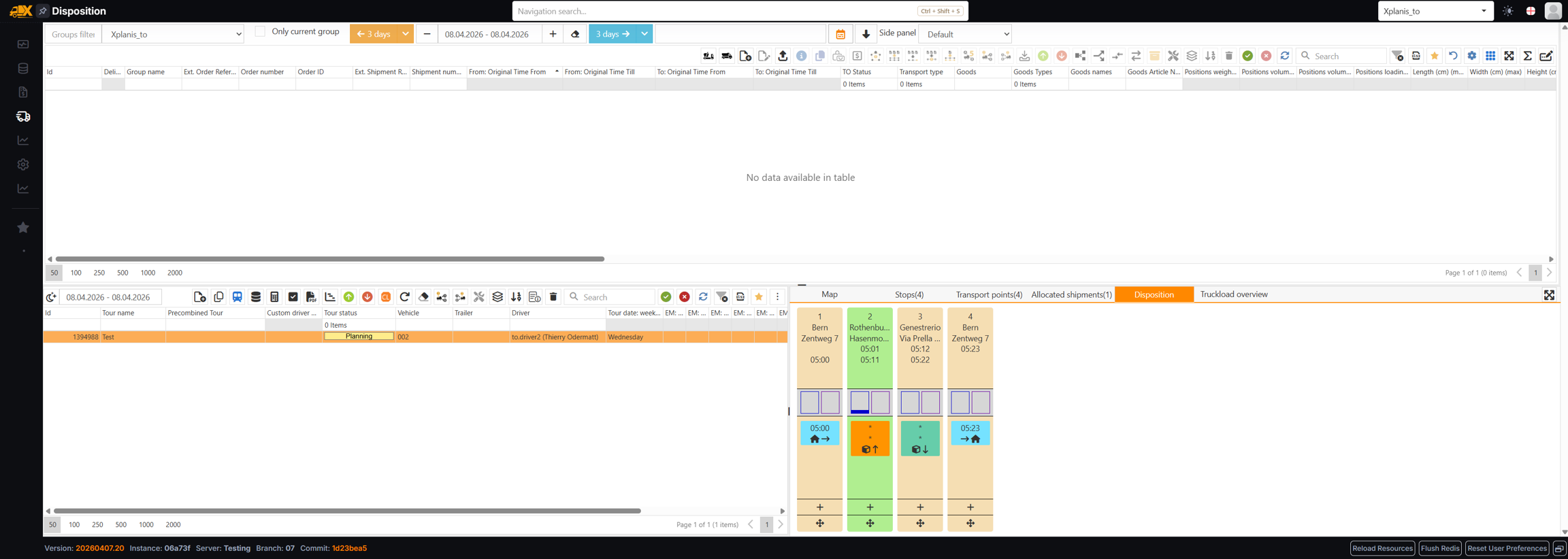
Several improvements have been made to route planning functionality, forming the foundation for integrating the next-generation planning engine (Optiflow from PTV Developer) and enhancing the existing xServer-based planning workflow. The Optiflow integration is the first MVP fully replacing xServer1; full implementation will follow in Q2 2026.
Highlights:
- New selection of routing service: operators can now choose per tour and via a system-wide default between the established xServer1 engine and the new Developer engine (Optiflow). A “Planning Service” column has been added to the tour table for easier identification.
- Maximum optimization duration can now be configured per tour when using Optiflow, giving operators more control over the trade-off between planning time and quality
- Routing service selection is also available when creating tours via the Gateway API
- Improved logic for the Feldweibeln button: the optimization request now directly uses the pre-combined tour plan, resulting in cleaner and faster recalculations without unnecessary unassignment of shipments
- Fixed: calculated sorting order (ExtSortOrder) is now correctly set and returned in API responses for pre-combined tour shipments
Important note:
- In Q1 we are releasing the beta version of the Optiflow integration. By default, the new optimization engine is disabled (opt-in behavior). You can enable it for selected tours to familiarize yourself with the engine and report issues or feedback to our support team.
- The beta includes the following features:
- Optimize
- Free tour planning
- Ignore windows (with the improvement that successfully planned shipments are not considered under ignored parameters)
- Break times (driver breaks are now calculated based on driving time, e.g., after 4 hours of driving a 30-minute break is required)
- Optimization detail level (dispatchers can define how deep optimization runs per tour. Generally, 5–10 seconds provides a good result; for complex tours, 60–120 seconds can be used for a very high-quality result. This can be set as a group default and overridden per tour)
- Vehicle locations and depots
- Vehicle parameters (master data should be kept up to date for best results)
- The following features are not yet included in the beta:
- Calculate
- Modify (will automatically use xServer)
- Feldweibeln functionality
- First/last stop
- Find best tour
- Vehicle capacities
- Warehouse and commissioning workflow
Warehouse & Commissioning Workflow
Building on the “Ready for Picking” feature introduced in Q4 2025, this release adds configuration options allowing operators to precisely control when and how the picking status can be used.
- New setting: “Enable picking for shipments without a tour” – when disabled, the “Picking” button is hidden for unassigned shipments, ensuring the workflow is only triggered after tour assignment
- New setting: “Enable reset of commissioning status” – when disabled, a commissioning status already sent to the warehouse system cannot be reverted, ensuring data integrity
Reporting & SFTP Export
This release introduces new reporting features and fixes issues related to report generation and delivery.
- New: “Send all reports via SFTP” button – dispatchers can now send tour reports directly to a configured SFTP server in addition to email, supporting automated downstream processing (e.g., WMS integration)
- When automatically sending reports to drivers, reports can now optionally also be sent to the SFTP server, improving automated distribution to external drivers
- Fixed: transport point photos in delivery notes are now correctly accessible and usable in report templates
Pre-combined Tours
Several usability and correctness fixes have been made for managing pre-combined tours.
- The shipment goods filter now supports all goods types (containers, items, liquids, services, etc.) – previously only liquid goods could be filtered
- Fixed: when adding a pre-combined stop via RefID, the POI field is now correctly populated (previously the RefID was incorrectly displayed twice)
System Integrations & API
Numerous improvements and fixes have been made to the Gateway API and integration layer, improving reliability for customers using automated workflows.
- Improved webhook reliability: tour webhook messages (GetWebhookTourMessages) now return correct results; split-shipment webhook filtering works correctly when “Exclude irrelevant split shipments” is enabled
- Fixed: the Gateway endpoint “CalculateTours” now correctly updates the tour status from “Planning” to “Planned” after successful calculation
- Fixed: deleting a tour via Gateway no longer fails with a database referential constraint error when tour validation results exist
- Fixed: “UpdateShipments” (PUT) via Gateway now correctly returns driver order product details in the response; data was stored correctly but not reflected in the API response
- Fixed: PDF attachments retrieved via “GetBlobContentByUrl” now return the correct Content-Type header (application/pdf)
- Improved webhook scheduling and retry handling: a new WebJobs-based mechanism introduces configurable timeouts and automatic retries, improving reliability of webhook-based integrations
- Table export (Excel) for large datasets (orders, unassigned shipments, tours) has been improved – previously it failed when record counts exceeded SQL Server parameter limits
Platform & Technical Infrastructure
In Q1 2026, several internal platform improvements were made to strengthen the technical foundation of X4fleet.
- The reporting service has been migrated to a cross-platform infrastructure and now supports cloud-native deployments
- Static technical documentation is now available directly within X4fleet for all logged-in users under /docs
- Various minor bug fixes and stability improvements across the platform
Thank you for your continued trust in X4fleet. We remain committed to delivering a stable, modern, and continuously improving transport management system. If you have any questions, please contact your account manager or our support team at any time.
This release delivers key initiatives from our Q4 roadmap, strengthens system integrations and continues the modernization of the X4fleet platform. It introduces new workflows for warehouse coordination, extends features for depot users and includes numerous improvements in reliability and performance.
Key Features & Improvements
"Ready for Picking" Workflow
A new "Ready for Picking" flag is now available for tours and shipments. This enables clearer coordination between dispatch and warehouse and allows automated notifications to connected systems.
Further improvements include:
- Improved tracking of picking approvals including user and timestamp
- Increased reliability of picking notifications to external warehouse systems
- Sequential shipment numbering per order for easy identification (e.g. S1.1, S1.2)
New Depot User Role
To better support depot and warehouse teams, a new depot user role has been introduced. Depot users can now:
- Modify existing tours without changing the assigned driver
The following extensions were also implemented to support warehouse processes:
- Improved multi-scan support for warehouse scan workflows
Improved Tour Planning Control
Dispatchers can now fix the first and/or last stop of a tour, giving them more control over route optimization and planning.
Platform Modernization
The platform continues its migration to .NET 10, benefiting from improved performance, long-term stability and a stronger foundation for future development.
Stability & Reliability Improvements
System Integrations & Data Quality
- More reliable and accurate webhook notifications across all shipment and tour lifecycle events
- Improved handling of split shipments and order references
- More robust product imports, especially for shipments with multiple products
Dispatch & Planning
- Improved assignment of shipments to pre-planned tours
- Better handling of complex shipment and multi-order scenarios
- Refinements to planning filters and area assignments
Quotes & Pricing
- Prices and surcharges from quote orders are now correctly taken into account in measurement and billing processes
Web Orders & Shipments
- Improved processing of loading units and bulk shipments
- More reliable creation of complex shipping units
General Improvements
- Corrections to various translations
- Customer-specific extensions for custom fields
- Improved invoice display and stability
App Improvements
- Checklist notifications are now displayed correctly
- Increased reliability of barcode scanning
We remain committed to providing a stable, modern and continuously improving transport management system.
Thank you for your trust and your valuable feedback in the ongoing development of X4fleet.
In this minor release, we provide two new features: Prevention of delivery note dispatch at quantity 0 and a grouping function within tables to work more efficiently and individually.
New Features & Improvements
- Backend-General: In the report generation settings, two new options have been introduced to prevent the creation and/or sending of a delivery note when the delivered quantity is set to zero or empty, or when the transport point contains no products.
- Backend-General: We are introducing a table grouping function that allows any table to be grouped by one or more columns. This offers more flexibility when working with large amounts of data, especially in the "Orders" or "Unassigned Shipments" tables.
This release marks an important milestone: the migration of the entire web module to a modern platform foundation. This brought the technical foundation of X4fleet up to date – for greater stability, performance and future-readiness.
Earlier steps already modernized the App API and Gateway; with this release, the final building block of the system architecture follows. For you, this means: few functional changes, but a significantly more robust and sustainable technical foundation.
New Features & Improvements
- Backend-General: Completion of the migration to the newer .NET standard for the entire web application
- Backend-WebOrder: The "Goods Article Numbers" field can now be searched
- Backend-Gateway: Contacts deleted via Gateway are now automatically removed from all relevant collections. New contacts with the same refId as a deleted contact are created as new entries
- Backend-Dispatch: The filter logic in planning areas has been corrected so that more detailed specification of filters is now possible
- Backend-General: Search in column and table filters is now only executed when the "Enter" key is pressed
- Backend-Dispatch: In the tour table, the "Cities Summary" column now shows only loading/unloading TP cities, without duplicates and sorted by TPs
- Backend-Dispatch: The tour table can now be sorted by day of the week, then by tour date and tour ID
- Backend-General: Various minor bugs, improvements and translation errors have been fixed
- App-Barcode Scanning: Fixed: the scan button was removed at start/end depots
- App-General: The signature screen can now be switched to full screen mode using the full-screen button. The setting is saved locally and can be reset at any time
- App-General: The new "Customer Notes" field from the GUI settings in the backend has now also been implemented in the app and is displayed when configured accordingly in the backend
- App-General: Items within a package are now displayed nested below their package in the app, analogous to the backend. Changes to the status of a sub-position automatically update the package
- App-General: Various minor bugs, improvements and translation errors have been fixed
We sincerely thank you for your support during this modernization phase.
With Release Q3-25, we are creating the technological foundation for the next development steps of X4fleet – with a focus on stability, performance and long-term investment security.
In this sprint, we are providing a compact release that focuses primarily on technical improvements and stabilization measures. At first glance, visible new features are absent, but in the background important optimizations have been made that further increase the reliability and quality of the application.
New Features & Improvements
- App-General: Version 16.7.11: For positions with product type = Service and unit = Minutes, a stopwatch function has been introduced in the app. This allows drivers to record the exact duration of the service using a Start/Stop timer – the minutes are automatically adopted as the quantity.
- App-General: Version 16.7.11: The app can now optionally play an alert sound when a tour has been changed in the backend. This acoustically alerts drivers to relevant changes – even without looking at the display.
- Backend-Route Split Rule: Route split rules now optionally take into account the opening hours of the locations involved. If the new setting is activated, splits are automatically postponed until both locations are open – this avoids planning errors on closed days.
Overview of changes:
- Technical developments were made that have a positive effect on performance, stability and long-term maintainability.
- Bug fixes were implemented to resolve minor inconsistencies – including in translations – and to improve usability.
- Gateway adjustments were made through which previously incorrectly handled fields are now processed correctly.
A heartfelt thank you for the feedback from day-to-day operations – it is a valuable component of our continuous improvement. This release is another step towards an even more stable and powerful system.
In this sprint, we are publishing a compact partial release focused on technical optimizations and stability improvements in the background. Although there are no major new features at first glance, we have made important improvements under the hood that contribute to the overall quality and reliability of the application.
In detail:
- Technical adjustments were made that further strengthen the performance and maintainability of the system.
- Bug fixes were carried out to resolve minor bugs and improve the user experience.
- Gateway corrections were implemented where specific fields were previously not filled in correctly – these are now processed as expected.
We thank you for the feedback from operational use, which helps us to continuously improve. This release is another building block on the path to an even more robust and efficient system.
Due to persistent performance issues, few major features were introduced; the primary focus remains on stabilization and performance improvement.
New Features & Improvements
- Backend-General: The automated test coverage has been further expanded to increase stability and detect issues early.
- Backend-General: Part of the webhook database structure has been revised: large table columns are now outsourced to blob storage. This significantly reduces the database size (previously approx. 70 GB), while important metadata remains in the table.
- Backend-General: Labels for custom fields are now cached via Redis to reduce database load and improve response times in the system.
- Backend-Gateway: The response of the "Get POI" gateway now correctly delivers all expected values, including specializations, attachments, location documents and contacts.
- Backend-Gateway: In the Shipment endpoint, product groups including the missing product group RefID have been added. This makes it possible to fully process shipments with assigned product groups via GET and POST.
- Backend-Gateway: To support ERP follow-up orders and invoicing based on actual/target quantities, new fields have been added to shipment positions in the endpoints /x4gateway/v1/import/shipment and /x4gateway/v1/import/tour:
quantityRequired, quantityActual, productRequired, productActual, quantityMeasured, productMeasured
A driverTasks array is now added directly to each shipment position to reference associated actual values.
Due to persistent performance issues, few major features were introduced; the primary focus remains on stabilization and performance improvement.
New Features & Improvements
- Backend-Map: When clicking on a marker action, the marker is now displayed directly on the monitoring map, instead of in a Winbox window.
- Backend-Dispatch: The date range selection for unassigned shipments has been revised to improve usability and facilitate filtering.
- App-TSG: Version 16.6.43: When closing a transport point or position, the app now automatically checks whether there are still pending TSG measurements. If so, these are displayed to the driver before the TP is finally closed.
- App-General: Version 16.6.42: In the tour download window, the current date is now always pre-selected. Previously, the date was only updated at driver login.
- Backend-General: At customer request, the shipping special feature "Fixed Day" can now be disabled. A new settings area allows the configuration of system special features per group and is intended for future extensions. By default, this setting is disabled for all groups.
- Backend-General: Various minor bugs have been fixed to improve overall system performance and reliability.
Performance:
Backend-General: Numerous targeted optimizations and technical measures have been implemented or are in progress to increase system performance in key areas:
- Unassigned shipments: Query for product display optimized (12.05.2025)
- Tour grid: Database queries significantly improved (20.05.2025)
- Migration DevExpress to DevExtreme: MVP successfully tested internally (20.05.2025)
- SQL database defragmentation: Response times significantly reduced, especially for unassigned shipments and tours (25.05.2025)
- Map markers (Google Maps): Check to increase limit to 2000 markers in progress (Sprint 70, 04.06.2025)
- Redis caching: Accounts, groups and settings are now loaded via Redis (Sprint 70, 04.06.2025)
- User settings in Redis: Recently added for better performance (Sprint 70, 04.06.2025)
- Query optimizations: Further improvements currently in progress
We are pleased to present various improvements to TSG handling and location documents on the latest app versions in this sprint.
New Features & Improvements
- Backend-General: Dispatchers can now open invoices directly from the Orders and Measurements pages. Hovering over the status shows a tooltip: "Double-click opens the invoice".
- Backend-Vehicle Management: A new calculated field VehicleTrailerCapacity has been added to tours. It shows the maximum possible weight of the vehicle-trailer combination and is displayed in the tour grid as CombinationCapacity (combination payload).
- Backend-TSG: TSG data is now only written to ProductMap and DriverTask after confirmation by the driver. This ensures that only validated measurements are saved and outdated or unconfirmed entries are avoided.
- App-TSG: Version 16.6.37: To avoid problems caused by missed TSG push notifications (e.g. in standby mode, when the app is running in the background or in case of connection loss), a new button has been introduced at TP level in the app. This allows the driver to request TSG values from the backend again, so that important data remains accessible even if a push notification was missed.
- Backend-Quotes: A new button in the quote footer enables document preview. In edit mode, "Save and Preview" saves the form and shows a temporary preview with a red notice message. In "ready" status, "Preview" shows the existing or a newly generated document.
- Backend-Orders: The new special feature "Fixed Day" marks shipments that must be picked up or delivered on a specific day. It complements the already known "Fixed Time" option.
Fixed Bugs:
- Backend-Dispatch: When the last shipment is unloaded from a tour, the tour now correctly switches to the Planned (Scheduled) status and no longer incorrectly remains in Planning status.
- App-Location Document: Version 16.6.32: When clicking Back or Cancel in the location document window, a warning is now displayed for unsaved data to prevent unintentional data loss.
- App-Location Document: Various improvements and optimizations around location documents.
Known Issues:
- General system performance: Due to persistent performance issues, all available resources are being used for stabilization and improvement.
We are pleased to present our new feature for freely configurable loading and unloading locations for reporting and invoicing, as well as the newly revised version of the AdHoc process!
New Features & Improvements
- Backend-Dispatch: For better filtering of shipments, a new date range component has been introduced. This is now used in the columns for the four original times and the tour date, enabling targeted search by time periods.
- Backend-Map: On the map, the primary color (circle color and inner color of the oval) can now be switched from product to day of the week (the other color is only displayed as an outline for the oval).
- Backend-Monitoring: In monitoring and the deployment overview, a new "Show Shipment" function has been added to open the referenced order.
- Backend-Incidents: Emails are now sent correctly even if only one additional email address has been entered and no recipient checkbox is selected.
- Backend-Incidents: From now on, you can specify that incident emails are sent directly to the customer and/or the client of a shipment. Two new options – "Email to Customer" and "Email to Client" – are available under the email settings. When activated, emails are automatically sent for incidents at LEOs – provided the transport point is assigned to exactly one shipment.
- Backend-Settings: In Settings - GUI Settings Web/App, customFields are now displayed with their defined labels.
- Backend-Orders: Shipment – when the new POI replacement settings in the shipment settings are activated, the loading and unloading locations for reporting and invoicing can be replaced per shipment. This makes it possible to pick up a shipment from an "External Depot" but still show "Own Depot" as the pickup location in the delivery note and invoice. It is possible to use a fake POI that is not related to the shipment, or in the case of route splits, it can be defined that the parent pickup is shown instead of the last depot of the split.
- Backend-Invoicing: Invoicing – shipments can now be marked as "Not Billable/No Invoice" (checkbox on the right side of the shipment). When this option is activated, the shipments are not listed in the commercial shipments table and it is prevented that these shipments are invoiced.
- Backend-Trip Overview: In the trip overview, a new context menu "Edit Tour" is now available via right-click on a tour. This works like the existing "Show Tour" but opens the tour's edit form directly – just like a double-click in the tour table.
- Backend-WebOrder: In the weborder settings, a shipment report layout can now be selected, so that a corresponding button is displayed in the weborder order overview. For weborder shipments from the "Sent" status onwards, a report can be generated: For a single shipment, the PDF is opened as a preview; for multiple, a ZIP download is made with one document per shipment.
- Backend-Gateway: The gateway now allows the creation, retrieval and deletion of users via the API. External systems can create users via POST and specifically manage them with GET or DELETE. The endpoints are accessible at /x4gateway/v1/import/users and support both ID- and reference-based queries.
- App-AdHoc: The AdHoc order function in the X4fleet Driver App has been revised: The UI/UX has been redesigned and now offers either a guided wizard or a traditional form for creating AdHoc orders. The user can select which interface to use via the app settings menu (top right > AdHoc Order Wizard). The new function gives the user access to all required master data from the X4fleet backend. In addition, an existing order from within the tour can be used as a template for creating another order. The previous AdHoc feature continues to be fully available in the app and is used by default. The new AdHoc feature is only available in the app if it has been configured in the backend. This function requires app version 16.5.30/17.5.30 or higher. Please contact Xplanis AG for more information or assistance in configuring this feature.
Fixed Bugs
- Backend-General: Issues in various search and filter functions have been fixed.
- Backend-General: A problem with the automatic generation of framework tours has been fixed.
- Backend-Dispatch: The dimensions of positions within a shipping unit are now included in the calculation and display of the tour.
- Backend-Reports: A problem with the automatic sending of driver documents has been fixed.
We are pleased to present our new function for calculating tolls and emissions in this sprint!
New Features & Improvements
- We have a new module that enables the calculation of emissions and international toll fees per tour.
- To support better integration of OpenCam, the Driver App now uses OpenCam by default if installed.
- The geofencing functionality for locations has been extended to all function entry points and transitions.
- Messages about status changes of location documents in the app are now hidden by default.
- Framework tours and recurring orders – adding the ability to define specific dates for generation to existing conditions.
- Picking – adding a configurable button to the picking grid to assign and reassign shipments to a tour.
- If the transport point has images, they are now displayed in the shipment editing form in the loading and unloading section at the bottom right.
- Sending invoices and delivery notes by email – setting the subject and body of the email has been improved.
- It is now possible to open location master data from the monitoring transport point window.
- Two new fields have been introduced to display the recipients of automatically sent pickup and delivery notes.
- Technical adjustments to improve import performance.
Fixed Bugs
- Various bug fixes for search and filter functions.
- Fixed that positions created from position rules with quantity mode one had quantity 1 instead of 0, which was incorrect.
- Fixed that when copying shipments and orders, not all specialties were copied correctly.
- Fixed that shipments with negative position values were added to the tour and no transport points were created.
- In some cases, incorrect order time windows were transferred to the app. This caused the order time window in the app (red times) to display incorrect values, such as 00:34 instead of 00:00 or *. This issue has been fixed and the times are now displayed correctly again.