

Transport Orders / Shipments
The transport order is the essential entity for planning and fulfilling shipments in X4fleet. As the entity is very extensive, its data structure is described first, followed by the most important segments.
Furthermore, most properties are optional, since depending on the use case not all data is available or is only added later in the process.
In principle, the earlier the dispatcher knows the information relevant to the transport, the better they can plan resources such as vehicle and driver in advance. The priority is:
- When and where should something be loaded
- When and where should this something be unloaded
- Which quantities, volumes and weights should be transported
- Is there anything special to note about goods, sites and during transport?
Endpoints
POST /x4gateway/v1/import/shipment
as well as
GET /x4gateway/v1/import/shipment/{id} --> standard GET request by shipment ID
GET /x4gateway/v1/import/shipment --> GET request by RefID and/or shipment date and/or source system
GET /x4gateway/v1/import/shipments --> GET request by multiple RefIDs and/or source system
DELETE /x4gateway/v1/import/shipment/{id} --> standard DELETE request by shipment ID
DELETE /x4gateway/v1/import/shipments --> DELETE request by multiple shipment IDs
PUT /x4gateway/v1/import/shipment/{id} --> UPDATE request by shipment ID
PUT /x4gateway/v1/import/shipment --> UPDATE request by RefID
Request
As the request structure is used differently depending on the use case, we stick to the basic application here. Different example requests can be viewed and copied further below.
Basic structure / overview:
[
    {
        "id": 0,                          //Shipment ID (assigned by the system)
        "extOrderRefId": "string",        //Order reference from the customer
        "orderNumber": "string",          //Sales order (can have N shipments)
        "refId": "string",                //Shipment reference (e.g. from the ERP)
        "groupId": 0,                     //If the order should go into a specific subgroup
        "source": "string",               //Source system, the same RefIds from different sources are allowed
        "client": {[]},                   //Customer
        "provider": {[]},                 //Client
        "pickup": {[]},                   //Pickup location
        "dropoff": {[]},                  //Delivery location
        "products": [{},],                //Shipment positions / articles
        "datePickup": "datetime",         //Planned pickup/tour date
        "status": 0,                      //Shipment status, ENUM
        "fiscalStatus": 0,                //Billing status, ENUM
        "note": "string",                 //Shipment note, free text
        "customField1": "string",         //Shipment custom field, must first be configured in the backend
        "specialities": [],               //Shipment specialities, must first be configured in the backend
        "skills": [{},],                  //Driver skills, must first be configured in the backend
        "checklists": [{},],              //Shipment-relevant checklists, must first be configured in the backend
        "vehicleQualifications": [{},],   //Vehicle qualifications, must first be configured in the backend
        "agreedIncome": 0,                //Agreed income (overrides general carrier tariff and position values)
    }
]
Enums used: Shipment status, FiscalStatus.
Client / Provider
The client (provider) has submitted the transport order to the X4fleet tenant. The customer (client) has a business relationship with the client (provider), not necessarily with the X4fleet tenant. Costs for goods, services and transport are billed to the client (provider).
As an example, the customer has ordered a laptop from the client (provider). The client (provider) commissions the Xplanis customer with the transport. The laptop is invoiced to the customer by the client (provider). The Xplanis customer in turn invoices the transport to the client (provider).
The Provider (client) and Client (customer) segments are similar in structure, however a customer is not required in every transport order, therefore only Provider is described below.
"provider": {
  "id": 0,                              //Business partner ID (assigned by the system)
  "refId": "string",                    //Business partner ID from ERP
  "organisation": "string",
  "contactName": "string",
  "name2": "string",
  "clientNumber": "string",
  "guSurchargePercent": 0,              //Surcharge / discount %
  "guFuelSurchargePercent": 0,          //Fuel surcharge %
  "guLoadingToolSurchargePercent": 0,   //Loading equipment surcharge %
  "guLoadingToolSurchargeFix": 0,       //Loading equipment surcharge absolute
  "phone1": "string",
  "phone2": "string",
  "email": "string",
  "location": {
    "id": 0,                            //assigned by the system
    "name": "string",                   //outdated/deprecated
    "streetAddress": "string",
    "postCode": "string",
    "city": "string",
    "countryCode": "string",            //2-digit country code e.g. CH
    "coordinates": {                    //if no address exists or it is not precise enough
      "lat": 47.193913278119449,        //if no coordinates are sent, the address is geocoded automatically
      "lng": 8.523516289875717
    },
  },
  "language": "string",                 //DE, EN, FR, IT, ES
  "contacts": [
    {
      "id": 0,                          //assigned by the system
      "refId": "string",                //Reference to the contact person from ERP
      "contactName": "string",
      "organisation": "string",
      "...": "...",                     //analogous to the business partner
      "isMainContact": true             //this contact is shown as the contact person by default
    }
  ],
  "poBox": "string",                    //PO box
  "fax": "string",
  "web": "string"
}
The same rules apply to contact persons as for business partners.
Pickup & Dropoff
Describes the location at which goods are loaded/picked up or unloaded/delivered.
"pickup": {
  "id": 0,                              //Pickup location ID (assigned by the system)
  "shipmentLocation": {                 //Site or address
    "kind": 0,                          //Type of site, ENUM
    "name": "string",
    "name2": "string",
    "organization": "string",
    "contactPhone": "string",
    "contactPhone1": "string",
    "contactPhone2": "string",
    "email": "string",
    "contacts": [],                     //Analogous to business partner / contact person
    "location": {},                     //Address of the site, analogous to business partner
  "start": "2025-03-28T15:02:55.359Z",  //From when goods can be picked up
  "end": "2025-03-28T15:02:55.359Z",    //Until when goods can be picked up
  "notes": "string"                     //Pickup note (also visible to the driver)
},
"dropoff": {},                          //Analogous to Pickup
Enums used: Site kind (kind).
When a shipment is created, the notes stored on the location of the pickup or delivery address are appended on a new line to the pickup or delivery note (notes). The dispo notes of the locations are appended to the dispo note of the shipment (noteHiddenForDriver), first those of the pickup location, then those of the delivery location. Empty notes and texts that are already contained in the shipment note are not appended. When an existing shipment is updated, no location notes are appended.
Via the properties start and end, time windows in which the pickup or delivery should take place can be defined:
- It is specified from when goods can be picked up (open end)
→ only passstart - It is specified until when goods must be picked up (open
start)
→ only passend - A fixed time window is specified within which the goods must be picked up (between)
→ pass both - An exact time is specified at which the goods must be picked up
→ pass both,startandendmust have the same value
Order position & article
"products": [                       // N order positions
  {
    "id": 0,                        //Shipment position ID (assigned by the system)
    "product": {                    //Article/service of the order position
      "id": 0,                      //assigned by the system
      "refId": "string"             //from the customer system, can reference X4fleet master data to use preconfigured articles
      "name": "string",
      "type": "string",             //Product, Service, Tool (loading equipment), Container (package)
      "unit": "string",             //see description
      "notes": "string",
      "description": "string",
      "diameter": 0,
      "palletCount": 0,
      "weight": 0,
      "volume": 0,
      "width": 0,
      "height": 0,
      "length": 0,
      "centiLiters": 0,
      "squareCentimetersPerUnit": 0,
      "loadingCentimeters": 0,
      "storageLocation": "string",
      "isVisibleOnApp": true,
      "nameTranslation": {},        //Translation of article name DE, FR, IT, EN, ES
      "descriptionTranslation": {}, //Translation of article description DE, FR, IT, EN, ES
      "notesTranslation": {},       //Transl. of article note DE, FR, IT, EN, ES
      "code": "string",
      "isPilable": true,
    },
    "requiredQuantity": 0,          //Required quantity
    "description": "string",
    "sortOrder": 0,                 //Sort order, if needed
    "refStr": "string",             //Reference to the customer system e.g. position in the sales order
    "storageLocation": "string",    //Storage/picking location
    "barCode": "string",
    "pickupNotes": "string",
    "dropoffNotes": "string",
    "totalPallets": 0,              //Number of pallets = EUR pallet 80x120cm
    "totalWeight": 0,               //Total dimensions are calculated automatically from the individual weights
    "totalVolume": 0,
    "totalCentiLiters": 0,
    "totalSquareCentimetersPerUnit": 0,
    "totalLoadingCentimeters": 0,
    "totalPrice": 0,
    "totalShippingPrice": 0,
    "price": 0,
    "isExplosive": true,
    "isHazardous": true,
    "isRefrigerated": true,
    "isTire": true,
    "code": "string"                //e.g. article code ERP
  }
]
Container structures can also be modelled, see Positions
All possible product units unit:
- Distances
- Centimeters, Kilometer, LoadingMeters, Meters, Millimeter, RunningMeters
- Areas
- SquareDecimeters, SquareMeters
- Volume
- CubicDecimeters, CubicCentimeter, CubicMeters, Deciliter, Liter
- Weight
- Gram, Kilo, Ton
- Time
- Days, Hours, Minutes
- Shipping units & miscellaneous
- Apparat, Bag, Bale, Barrel, BigBag, Bottle, Bundle, Canister, Carton, Cartridge, Cassette, Coil, Colis, Container, Diverse, EinwegPalet, EuroPalet, Flat, Gitterbox, Halbpalet, Kettle, P10, P100, P20, P50, Packaging, Pair, Parcel, Plate, Pole, Poster, Ring, Set, Tin, Tube, Unit
Import settings for transport orders
The following settings can only be set by the Xplanis administrators.
Via Settings > Settings > Import, the behaviour when sending transport orders and updating them can be configured.
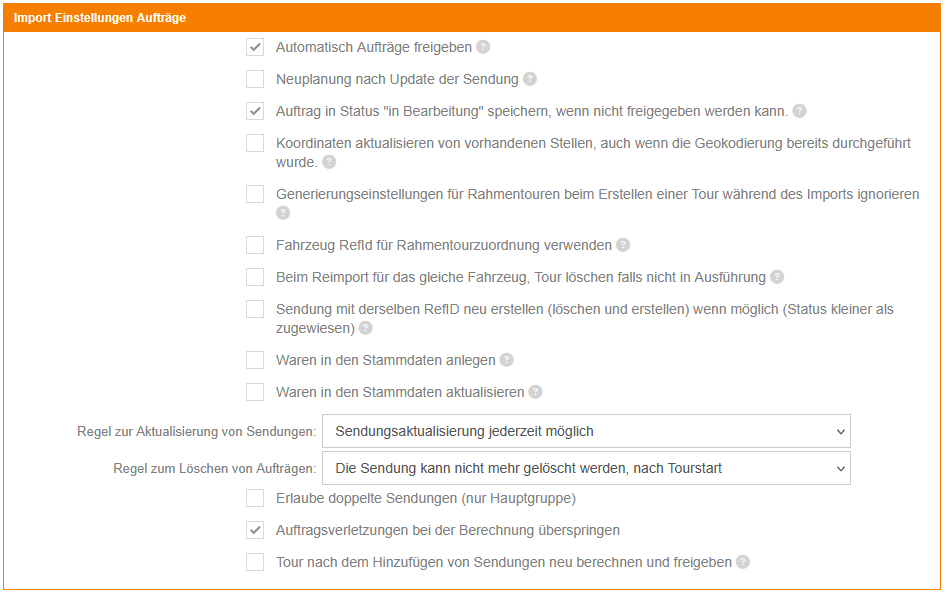
The most frequently used:
Automatically release orders- Often useful when transport orders coming from the customer system do not need to be enriched with additional information in X4fleet before they are dispatched
Rule for updating shipmentsShipment update possible at any time- i.e. also when the shipment is already being executed in a tour (not recommended)The shipment can no longer be updated after tour assignment- stable process at the cost of flexibility.The shipment can no longer be updated after tour release- In the case of relevant changes to the pickup/delivery location, date or quantities/volumes/weights, a shipment can "drop out" of an already planned tour. This should only be considered if good communication is ensured between the sales order clerk and the dispatcher, as changes here can disrupt the dispatcher's planning
Rule for deleting ordersis the counterpart to "Updating shipments"The shipment can no longer be deleted after tour assignment..., after tour release..., after tour start..., after loading start- Depending on the customer's internal process for handling spontaneous cancellations/postponements.
Response
The response structure is analogous to the request structure, and all information that was sent in the POST, as well as information added by the system, is returned.
Here the ID / shipment ID is an important piece of information that should ideally be retained in the upstream system.
In addition, the response contains the field troughProcessType (read-only). For dumpster orders, it indicates the process type: 0 = Place, 1 = Empty, 2 = Change, 3 = Fetch. For shipments without a dumpster order, the value is null. See also Enums.
Example requests
[
    {
        "extOrderRefId": "ExtOrderRefId",
        "orderNumber": "OrderNumber",
        "provider": {
            "refId": "XS0001",
            "organisation": "Muster AG",
            "contactName": "Max Muster",
            "name2": "Anlieferung",
            "phone1": "+41 61 123 45 67",
            "email": "info@muster-ag.ch",
            "location": {
                "streetAddress": "Musterstrasse 1",
                "postCode": "3006",
                "city": "Bern",
                "countryCode": "CH",
            },
        },
        "pickup": {
            "shipmentLocation": {
                "kind": 0,
                "name": "PickUp AG - Abholung",
                "name2": "Maskus Muster",
                "organization": "PickUp AG",
                "contactPhone": "+41 78 765 43 21",
                "email": "maskus.muster@pickup.com",
                "location": {
                    "streetAddress": "Mustergasse 5",
                    "postCode": "4001",
                    "city": "Basel",
                    "countryCode": "CH",
                },
                "refId": "XS0002",
            },
            "start": "2025-04-15T00:00:00.000Z",
            "end": "2025-04-20T00:00:00.000Z",
        },
        "dropoff": {
            "shipmentLocation": {
                "kind": 1,
                "name": "Muster AG - Depot",
                "name2": "Lager",
                "organization": "Muster AG",
                "location": {
                    "streetAddress": "Musterstrasse 1",
                    "postCode": "3006",
                    "city": "Bern",
                    "countryCode": "CH",
                },
                "refId": "XS0003",
            },
            "start": "2025-04-21T00:00:00.000Z",
            "end": "2025-04-21T23:59:59.000Z",
        },
        "datePickup": "2025-04-15T12:41:08.524Z",
        "refId": "L0001",
        "source": "ERP1",
    }
]
Existing master data can be referenced via RefId. Values passed along overwrite the master data. If a RefId has not already been recorded, it is created temporarily or permanently (depending on the entity and the import setting).
[
    {
        "extOrderRefId": "ExtOrderRefId",
        "orderNumber": "OrderNumber",
        "provider": {
            "refId": "XS0001",
            "organisation": "Muster AG",
            "contactName": "Max Muster",
            "name2": "Anlieferung",
            "phone1": "+41 61 123 45 67",
            "email": "info@muster-ag.ch",
            "location": {
                "streetAddress": "Musterstrasse 1",
                "postCode": "3006",
                "city": "Bern",
                "countryCode": "CH"
            }
        },
        "pickup": {
            "shipmentLocation": {
                "kind": 0,
                "name": "PickUp AG - Abholung",
                "name2": "Maskus Muster",
                "organization": "PickUp AG",
                "contactPhone": "+41 78 765 43 21",
                "email": "maskus.muster@pickup.com",
                "location": {
                    "streetAddress": "Mustergasse 5",
                    "postCode": "4001",
                    "city": "Basel",
                    "countryCode": "CH"
                },
                "refId": "XS0002"
            },
            "start": "2025-06-11T00:00:00.000Z",
            "end": "2025-06-12T00:00:00.000Z"
        },
        "dropoff": {
            "shipmentLocation": {
                "kind": 1,
                "name": "Muster AG - Depot",
                "name2": "Lager",
                "organization": "Muster AG",
                "location": {
                    "streetAddress": "Musterstrasse 1",
                    "postCode": "3006",
                    "city": "Bern",
                    "countryCode": "CH"
                },
                "refId": "XS0003"
            },
            "start": "2025-06-12T00:00:00.000Z",
            "end": "2025-06-13T00:00:00.000Z"
        },
        "products": [
            {
                "product": {
                    "refId": "ART10001",
                },
                "requiredQuantity": 5,
                "totalWeight": 55000,
            },
			{
                "product": {
                    "refId": "ART10002",
                },
                "requiredQuantity": 1,
            }
        ],
        "datePickup": "2025-06-11T12:41:08.524Z",
        "refId": "L0001",
        "source": "ERP1"
    }
]
Any number of products can be passed along; if the product can be referenced (via RefId), the master data stored in X4fleet is used. Specific values, such as the total weight, can be overwritten. If the product with this RefId does not exist, it is created temporarily (or permanently with the corresponding import setting).
[
    {
        "extOrderRefId": "ExtOrderRefId",
        "orderNumber": "OrderNumber",
        "provider": {
            "refId": "XS0001",
            "organisation": "Muster AG",
            "contactName": "Max Muster",
            "name2": "Anlieferung",
            "phone1": "+41 61 123 45 67",
            "email": "info@muster-ag.ch",
            "location": {
                "streetAddress": "Musterstrasse 1",
                "postCode": "3006",
                "city": "Bern",
                "countryCode": "CH"
            }
        },
        "pickup": {
            "shipmentLocation": {
                "kind": 0,
                "name": "PickUp AG - Abholung",
                "name2": "Maskus Muster",
                "organization": "PickUp AG",
                "contactPhone": "+41 78 765 43 21",
                "email": "maskus.muster@pickup.com",
                "location": {
                    "streetAddress": "Mustergasse 5",
                    "postCode": "4001",
                    "city": "Basel",
                    "countryCode": "CH"
                },
                "refId": "XS0002"
            },
            "start": "2025-06-11T00:00:00.000Z",
            "end": "2025-06-12T00:00:00.000Z"
        },
        "dropoff": {
            "shipmentLocation": {
                "kind": 1,
                "name": "Muster AG - Depot",
                "name2": "Lager",
                "organization": "Muster AG",
                "location": {
                    "streetAddress": "Musterstrasse 1",
                    "postCode": "3006",
                    "city": "Bern",
                    "countryCode": "CH"
                },
                "refId": "XS0003"
            },
            "start": "2025-06-12T00:00:00.000Z",
            "end": "2025-06-13T00:00:00.000Z"
        },
        "products": [
            {
                "product": {
                    "name": "Montage",
                    "type": "Service",
                    "unit": "Hours",
                    "notes": "auf 15min runden",
                    "description": "Montagezeit vor Ort",
                    "code": "SER10001",
                    "refId": "SER10001",
                },
                "requiredQuantity": 1,
                "dropoffNotes": "auf 15min runden, nicht vergessen!",
            }
        ],
        "datePickup": "2025-06-11T12:41:08.524Z",
        "refId": "L0001",
        "source": "ERP1"
    }
]
When using non-predefined products, the product type can also be set. For the available product types, see the enum list.
Common error messages
- {"code":99,"messages":["There was an general error","SqlDateTime overflow. Must be between 1/1/1753 12:00:00 AM and 12/31/9999 11:59:59 PM."],"RequestId":null,"Id":0}
--> Wrong date or date format. All dates must be specified in UTC. - {"code":45,"messages":["Shipment has invalid pickup/dropoff dates. Shipment OrderNumber = XXX."],"RequestId":null,"Id":0}
--> Wrong date or date format. All dates must be specified in UTC. - {"code":45,"messages":["Shipment has invalid date. Pickup date should be before dropoff date. Shipment OrderNumber = XXX."],"RequestId":null,"Id":0}
--> The pickup date must always be before the delivery date. - {"code":99,"messages":["There was an general error","Product unit Days is not available for containers."],"RequestId":null,"Id":0}
--> We have various product types, and not all product units are available for all product types (e.g. hours are not available for liquids). Check the relevant enum, otherwise contact our support. - {"code":7,"messages":["Shipment cannot be inserted because there is already one","property: RefId='XXX', Source='XXX'"],"RequestId":null,"Id":0}
--> Duplicates are switched off for this group; the shipment RefID must be unique per source system (source).